Guides Profit tracking
Pay-Per-Call Profit Tracking: Spreadsheet vs Call Platform vs Tracker vs Slack P&L
Pay-per-call profit tracking puts call payout next to ad spend and call-platform fees for the same time window. There are five common ways to do it: a manual spreadsheet, call-platform reports (usually call-side only), an ad tracker with call integration such as RedTrack or ClickFlare, a DIY automation built on Make or n8n, and a Slack P&L such as ROI. Choose by whether you need click-level attribution or just profit, how fast you need the number, and who maintains it.
Updated
Key facts
- Call tracking answers “which ad drove this call?” Profit tracking answers “after spend and fees, is this account up or down?”
- The five methods solve different jobs. None is wrong. Pick by the question you need answered.
- Profit needs one window and one time zone for every line: payout, each ad platform’s spend, and fees.
- Competitor prices are as of 13 October 2026. Check them on the day you buy.
The short answer
Each method below answers a different question. This table compares them on what you see, how often it updates, what it costs to set up, and who it suits.
| Method | What you see | Refresh | Setup effort | Attribution | Best for |
|---|---|---|---|---|---|
| 1. Spreadsheet | Profit, ROAS, and cost per call, from numbers you enter | When you update it, usually daily | Low to start; ongoing typing | None | One daily number, one account |
| 2. Call-platform reporting | Call-side revenue, payout, and profit inside the call platform | Live in the platform | Low; already in your account | Call-level, not ad-level | Checking calls, not ad spend |
| 3. Ad tracker + call integration | Ad-level and click-level reporting, with call conversions | Set by your plan (see pricing below) | Medium to high; tracking setup | Click-ID and conversion-level | Attribution and optimisation |
| 4. DIY automation | Whatever you build: usually a Sheet or Slack post | Whatever you schedule | High; an engineer maintains it | Only what you code | Teams with a builder who will own it |
| 5. Slack P&L (ROI) | Net profit, ROAS, and CPA per ad account, next to spend and payout | Every 15–30 minutes, depending on setup | Low for you; setup via a booked meeting | None (not its job) | A profit glance and team visibility |
Track profit vs track calls
Most “pay-per-call tracking” pages are about call tracking: which ad, keyword, or click produced a call, and where the caller went. That is a real job, and call-tracking vendors do it well. It is a different job from profit tracking.
Profit tracking takes the money in and the money out and puts them side by side. Call payout is the money in. Ad spend from Meta, Google, and TikTok, plus call-platform fees, is the money out:
Net profit = call payout − Meta spend − Google spend − TikTok spend − call-platform fees.
If Meta is one of your spend lines, the pay-per-call Facebook ads guide covers call ad setup and what Meta counts.
Two more terms come up in every method. ROAS (return on ad spend) is (revenue − ad spend) ÷ ad spend, with revenue = call payout. It ignores fees, so it tells you how efficiently traffic is turning into payout, not whether the account makes money. The pay-per-call profit formula guide defines ROAS, ROI, break-even cost per call, and the rest, with a hypothetical worked example. Use it as the reference for every method here.
Method 1: Spreadsheet
A spreadsheet is the cheapest method and the one most buyers start with. You export payout from the call platform, export spend from each ad platform, and type the fees in. Then the sheet does the division.
Copy the column layout in the formula guide’s spreadsheet section: one row per day or per account per day, inputs in the first columns, and formulas for ad spend, net profit, ROAS, cost per call, and break-even cost per call. Paste the formulas into row 2 and fill down.
For one scenario and no sheet, the free pay-per-call ROI calculator does the same math.
The usual pitfalls are the same as in the formula guide:
- Time zones. Each ad account has its own zone, and so does the call platform’s report. Meta’s help centre explains how to change an ad account’s time zone, and that changing it can close the account and create a new one (Meta: change your ad account time zone). Google Ads has its own account time zone setting (Google Ads time zone setting). Pick one zone and convert the others.
- Billable vs all calls. Divide payout and spend by the same count of calls. Mixing a billable-call denominator with an all-call denominator makes break-even look better than it is.
- Late payout adjustments. Calls still in progress and calls later adjusted or returned both move the payout figure. Re-pull the sheet before you call a day final.
A sheet works until you need the number while traffic is running. Then the cost is the daily export, the paste, and the check. That cost is the reason most teams move to one of the next four methods.
Method 2: Call-platform reporting
Your call platform already knows the calls, the payout, and the fees. Ringba’s Summary and Call Details reports show Revenue, Payout, and Profit, along with a Paid column for calls that met the payout requirements. Ringba defines Profit as “the net amount of money earned from the call after expenses” (as of 8 October 2026; see Ringba Summary Report).
Its documented reports don’t include Meta, Google, or TikTok ad spend. So Ringba’s Profit is a call-side number, not an ad-account profit number. The Ringba + Facebook Ads profit report guide walks through the join and what Ringba’s Facebook integration does and doesn’t do. That integration pushes conversions to Meta. It is not a spend feed and it is not a profit report.
Other call platforms have similar reporting. Whichever you use, check its documented columns before assuming it shows spend. Some call-side tools send scheduled summaries. CallGrid’s MCP automations, for example, deliver read-only summaries to Slack, Gmail, Sheets, or Notion through your own connector (as of 13 October 2026; CallGrid MCP automations). Its published examples show call-side metrics only, with sample data, and no ad spend. Ringba’s MCP connector lets an AI assistant answer questions about Ringba data, but its article doesn’t list ad spend (as of 26 October 2026; see Ringba MCP and AI assistants).
Use this method when you need to check calls and payout. Don’t use it as your only profit number, because the spend line is missing.
Method 3: Ad tracker with call integration
Trackers such as RedTrack and ClickFlare are built for attribution. They record clicks and click IDs, connect ad-level spend, and can send call conversions back to ad platforms. That is what they do well, and it is the main reason to choose one. ROI’s own RedTrack alternative page says the same: RedTrack is stronger at click-ID attribution and at sending call conversions back to Meta and Google.
Prices as of 13 October 2026. Check each pricing page before you buy.
- RedTrack (redtrack.io/pricing): Solo $169/mo ($141/mo annual) with hourly ad spend sync; Team $399/mo ($333/mo annual) with 30-minute sync; Enterprise $999/mo ($833/mo annual). Faster ad-level sync is a paid add-on priced by monthly ad spend. 14-day free trial.
- ClickFlare (clickflare.com/pricing): Starter $89/mo ($69/mo annual), Pro $219/mo ($169/mo annual), Master $429/mo ($329/mo annual). 14-day free trial.
A tracker gives you the most detail. It also takes the most setup: pixels, click parameters, postbacks, and a person who checks them. And a tracker is not a profit glance. Its reports are built around attribution, so you still need to subtract fees and sum the accounts yourself, or pair the tracker with another method. If you already run a tracker and want a profit number in Slack, you don’t have to replace it. See the “how to choose” section below.
Method 4: DIY automation
You can build the report yourself. A typical build uses Make or n8n, the Meta Marketing API, and the call platform’s API, then writes the totals to a Google Sheet or a Slack channel. The formula is the same one above. The cost is build time and upkeep: API changes, token renewals, a broken schedule, and the one person who knows how it works.
Choose DIY if you have an engineer who will own the flow for as long as you run it. If nobody owns it, the report stops working quietly. A sheet, a call-platform report, or a managed Slack report is then safer. The integration guide linked above covers the Ringba side of the API join.
Method 5: Slack P&L
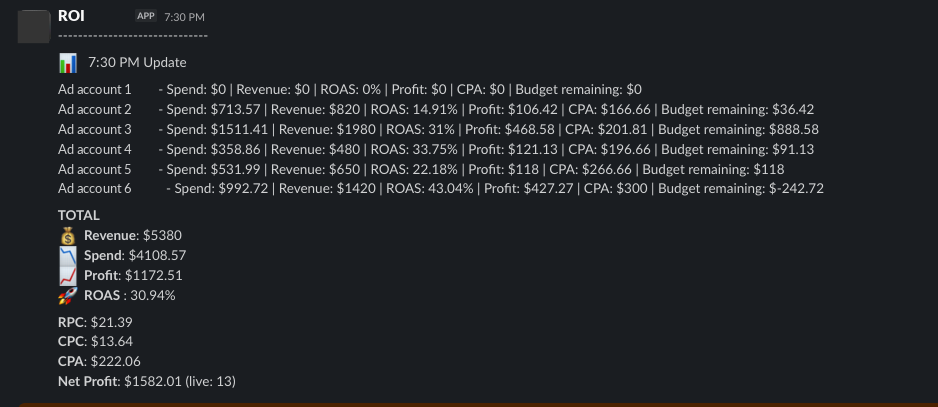
A Slack P&L is a read-only report that puts call payout next to Meta, Google, and TikTok spend, subtracts the call-platform fees, and posts the result in Slack. ROI works this way. It reads spend from Meta Ads, Google Ads, and TikTok Ads, reads payout from one call platform (Ringba, CallGrid, TrackDrive, Retreaver, or Phonexa), and posts net profit, ROAS, and per-account totals every 15–30 minutes, depending on setup.
The limits are real, and they matter when you choose:
- One call platform at a time. ROI reads payout from one platform, not several.
- Per ad account, not per campaign. The readout is totals per account.
- No click-ID attribution. ROI doesn’t do click-level attribution or send conversions back to Meta or Google. That is a tracker’s job.
- Read-only. ROI never bids, pauses, or scales ads. You can revoke access.
Between the call platform’s own report and a full tracker, this is the method that answers “am I up or down today?” without setup on your side beyond access. Setup starts with a booked meeting, where the team looks at your stack and you share read-only access.
How to choose
Start from the question you need answered:
- You need click-level attribution or call conversions sent back to Meta or Google. Use a tracker. See the RedTrack alternative page for how a tracker and a Slack P&L differ.
- You need a profit number and team visibility, without building anything. Use a Slack P&L such as ROI.
- You need both. Keep the tracker for attribution and add a Slack P&L for profit. The two do different jobs.
- You only need the number once a day. A spreadsheet is enough.
- You have an engineer who will own the flow. A DIY build is an option. Plan for upkeep.
- You run ACA traffic during open enrollment. Payouts and caps move around the deadlines, so watch profit during the day. See the ACA pay-per-call guide.
If you want a daily Slack thread of winning ads rather than a profit number, that is a different product: Drops. It is not part of the profit method above.
Common mistakes
Leaving out call-platform fees
Payout minus ad spend is a gross number. The fees are a real cost, and leaving them out overstates profit. The gap is often visible when you compare ROAS with ROI, as the formula guide shows.
Mismatched time zones
An ad account’s day and a call platform’s day can start at different hours. If you pull one report in Pacific time and the other in your local zone, the same “day” covers different calls. Pick one zone and convert.
Mixing denominators
Dividing payout by billable calls and spend by all calls flatters the result. Use the same count on both sides of any ratio.
Mid-day numbers on calls still in progress
A call still in progress has no final payout yet. Mid-day profit can be too low if live calls will pay, or too high if calls are later returned. ROI’s Slack readout shows this directly: Profit counts completed calls only, and Net Profit adds the estimated revenue from calls still in progress.
Spend-only reports called “profit”
A report with spend and payout but no fees line is a spend report. Call it that.
FAQ
-
What’s the best way to track pay-per-call profit across Meta, Google, and TikTok?
There isn’t one best way. A spreadsheet is cheapest and enough for one daily number. A Slack P&L gives a profit view across all three platforms without building anything. A tracker gives click-level attribution. Many teams use a tracker for attribution and a separate profit report for money.
-
Can my call platform show profit, including ad spend?
Call platforms usually show call-side revenue, payout, and profit. Their documented reports generally don’t include Meta, Google, or TikTok spend. Check each platform’s documented columns before you assume a feature exists. Adding spend is the join described in the Ringba + Facebook Ads guide.
-
Do I need a tracker like RedTrack or ClickFlare to track profit?
No. You need spend, payout, and fees in one window. A tracker adds click-level attribution and conversion sending, which is valuable if you need those. If you only need profit, a spreadsheet or a Slack P&L is enough.
-
How much time does manual reporting take?
It depends on your accounts and how often you export. One figure from a pay-per-call team buying on Meta and Google, as published on ROI’s page and attributed to LeadVIPS: “3 hours of daily reporting to zero.”
-
Is a Slack report enough, or do I still need a dashboard?
A Slack report is enough for a daily or intraday profit check per account. A dashboard helps when you need to drill into campaigns, creatives, or time-of-day patterns. ROI reports per ad account, not per campaign, so pair it with your ad platform’s own reports for campaign-level work.
-
Which formula should I use?
Net profit = call payout − Meta spend − Google spend − TikTok spend − call-platform fees, for one window and one time zone. The pay-per-call profit formula guide defines each term and includes a hypothetical worked example.
-
Which should I choose if I’m just starting?
Start with a spreadsheet using the formula guide’s columns, so you learn the numbers. Move to a Slack P&L when the daily export becomes the bottleneck. Add a tracker when you need click-level attribution.
Sources
Ringba quotes were checked on 8 October 2026 for the formula guide and were not re-fetched for this page. Competitor prices and CallGrid details are as of 13 October 2026. Re-check all of them before relying on them.
- Ringba: Summary Report
- Ringba: Call Details Report Column Dictionary
- Ringba: Facebook Offline Events Integration (Call-Only Ads)
- CallGrid: MCP automations
- RedTrack pricing (as of 13 October 2026)
- ClickFlare pricing (as of 13 October 2026)
- Meta Business Help Center: Change the time zone for your ad account
- Google Ads Help: About your Google Ads time zone setting
Easy Growth Ops is not affiliated with Ringba, CallGrid, RedTrack, ClickFlare, Google, or Meta.
30 minutes
Book a meeting.
We’ll look at your stack. You share read-only access. First Slack update the same week.
Book a meetingOr read the full product page: ROI.