Guides Formulas
How to Calculate Pay-Per-Call Profit, ROAS, and ROI (With Formulas)
Pay-per-call net profit = call payout − ad spend (Meta + Google + TikTok) − call-platform fees. ROAS = call payout ÷ ad spend (as a return: (payout − spend) ÷ spend). ROI = net profit ÷ total cost (ad spend + fees). Break-even cost per call = average payout per call − fees per call.
Example (hypothetical): $5,000 payout, $4,000 ad spend, $300 fees → $700 net profit, ROAS 1.25× (a 25% return on spend), ROI 16.3%.
Updated
Key facts
- ROAS ignores call-platform fees. Net profit and ROI subtract them.
- The same day can be written as “ROAS 125%” (Google’s convention) or “25% return on spend”. Say which one you mean.
- CPC means cost per click in Meta and Google Ads, but some pay-per-call reports use it for cost per call. Label it.
- Use one time zone and one call count for every number on the sheet.
The pay-per-call profit formula
Buyer-side pay-per-call has three money lines: what the calls paid, what the traffic cost, and what the call platform charged. The formula Easy Growth Ops publishes puts all three in one line:
Net profit = call payout − Meta spend − Google spend − TikTok spend − call-platform fees.
Leave a platform at zero if you don’t buy on it. Here is one hypothetical day for one account, so you can check the math:
| Line (example) | Value | How it’s calculated |
|---|---|---|
| Call payout | $5,000 | From the call platform |
| Ad spend | $4,000 | Meta $2,500 + Google $1,000 + TikTok $500 |
| Call-platform fees | $300 | From the call platform’s billing |
| Calls / billable calls | 200 / 125 | From the call platform |
| Net profit | $700 | $5,000 − $4,000 − $300 |
| ROAS | 1.25× (125%) | $5,000 ÷ $4,000 |
| Return on ad spend | 25% | ($5,000 − $4,000) ÷ $4,000 |
| ROI | 16.3% | $700 ÷ ($4,000 + $300) |
| Cost per call | $20.00 | $4,000 ÷ 200 |
| Revenue per call | $25.00 | $5,000 ÷ 200 |
| Break-even cost per call | $23.50 | $25.00 − ($300 ÷ 200) |
Definitions
- Call payout. The money you are owed for calls in the window. In Ringba that is the Revenue or the Payout column, depending on your seat (see common mistakes).
- Billable call. A call that meets the buyer’s payout rules, such as a minimum duration. Ringba’s Summary report counts them in its Paid column (as of 8 October 2026; Ringba Summary Report).
- Revenue per call (RPC). Call payout ÷ calls. Ringba’s Summary report shows RPC as “the average revenue amount for calls in this group” (as of 8 October 2026; Ringba Summary Report). Always say which calls you divided by: all calls or billable calls.
- Cost per call. Ad spend ÷ calls. Watch the acronym: in Meta Ads Manager, CPC is cost per link click, “amount spent divided by link clicks” (as of 8 October 2026; Meta: CPC (cost per link click)), and in Google Ads, CPC is what you pay for each click on your ad (Google Ads: Cost-per-click (CPC)). If your sheet uses CPC for cost per call, label the column.
- CPA. Cost per acquisition. Google Ads defines it as “total cost divided by total conversions” (as of 8 October 2026; Google Ads Glossary). In pay-per-call, write down what counts as an acquisition.
- ROAS. Return on ad spend. Google Ads calculates it as “total conversion value divided by total spend”, shown as a percentage (as of 8 October 2026; Google Ads Glossary). Some teams show the return instead: (payout − spend) ÷ spend. That is the first number minus 100%.
- ROI. Return on investment. Google’s glossary uses “total profit divided by total spend” (as of 8 October 2026; Google Ads Glossary). For pay-per-call, count fees as spend too: net profit ÷ (ad spend + fees).
- Call-platform fees. What your call platform charges you. Ringba’s Call Details report, for example, has per-call Telco Cost and Total Cost columns (as of 8 October 2026; Ringba Call Details Report Column Dictionary).
ROAS vs ROI vs profit: which to watch
| Metric | Formula | Answers | Blind spot |
|---|---|---|---|
| Net profit | Payout − ad spend − fees | Did we make money, in dollars? | Says nothing about efficiency: $700 on $4,000 or on $40,000 looks the same |
| ROAS | Payout ÷ ad spend | How much payout per $1 of ads? | Ignores fees; inflated by payout that later gets adjusted down |
| ROI | Net profit ÷ (ad spend + fees) | What did each $1 of cost return? | Only as good as your fee number |
| Break-even cost per call | Payout per call − fees per call | What’s the most I can pay for a call? | An average; a cheap hour can hide an expensive one |
Net profit tells you where you stand. ROAS compares traffic quickly. Break-even cost per call sets your ceiling.
Break-even cost per call and break-even ROAS
- Pick the window and the call count. Same dates, same time zone, and one definition of “call” (all calls or billable calls) for every line below.
- Work out average payout per call. Call payout ÷ calls. In the example: $5,000 ÷ 200 = $25.00.
- Work out fees per call. Call-platform fees ÷ calls. In the example: $300 ÷ 200 = $1.50.
- Subtract. Break-even cost per call = $25.00 − $1.50 = $23.50. Pay more than that per call and the account loses money.
- Compare with what you pay. Actual cost per call is $4,000 ÷ 200 = $20.00, so there is $3.50 of room per call, which is the $700 of net profit across 200 calls.
Break-even ROAS comes from the same numbers. You break even when payout = ad spend + fees, so break-even ROAS = 1 + fees ÷ ad spend. In the example that is 1 + $300 ÷ $4,000 = 1.075×, or a 7.5% return on spend. So there is no universal “good ROAS” for pay-per-call: it depends on your fees, and on costs outside this formula, such as salaries.
Common mistakes
Leaving out platform fees
In the example, return on ad spend is 25% but ROI is 16.3%. The gap is the $300 of fees.
Mismatched time zones
Each ad account has its own time zone. Meta’s default for new ad accounts is Pacific Standard Time, and changing it closes the account and creates a new one (as of 8 October 2026; Meta: change your ad account time zone). Google Ads reports by the account time zone and no longer supports changing it in standard accounts (Google Ads time zone setting). Ringba shows Call Date “in your local time zone” (Ringba Call Details Report Column Dictionary). If those differ, the same “day” covers different hours. Pick one zone and convert.
Counting non-billable calls
Dividing payout by billable calls and spend by all calls makes the break-even look better than it is. Use the same denominator on both sides.
Publisher vs network payout in Ringba
In Ringba, Revenue is “the gross amount of money earned from calls generated” and Payout is “the amount of money to be paid to your publisher” (as of 8 October 2026; Ringba column dictionary). If you own the Ringba account, your income is usually Revenue; if you publish into someone else’s, it is usually Payout. Our Ringba + Facebook Ads profit report guide covers this trap in more detail.
Stale or still-moving numbers
Ringba updates a call’s Revenue after the call is complete, and its Summary report has a Live column for calls still in progress (as of 8 October 2026; Ringba Summary Report). Payout can also change later: Ringba’s Call Details report flags calls whose payout or revenue an admin adjusted, and buyer adjustment requests that were approved (Ringba column dictionary). Google Ads reports its primary conversion columns by click time and notes reporting lags of up to 24–48 hours (as of 8 October 2026; Google Ads: understand your conversion tracking data). A mid-day ROAS can be too low (calls still live) or too high (calls later returned).
Spreadsheet version
One row per day (or per account per day). Inputs go in A–H; paste
the formulas into row 2 and fill down. Wrap the
divisions in IFERROR(…, "") if some rows have zero calls.
| Column | Holds | Formula (row 2) |
|---|---|---|
| A–H | Date, call payout, Meta spend, Google spend, TikTok spend, call-platform fees, calls, billable calls | Inputs |
| I | Ad spend | =C2+D2+E2 |
| J | Net profit | =B2-I2-F2 |
| K | ROAS (×) | =B2/I2 |
| L | Return on ad spend (%) | =(B2-I2)/I2 |
| M | ROI (%) | =J2/(I2+F2) |
| N | Cost per call | =I2/G2 |
| O | Revenue per call | =B2/G2 |
| P | Break-even cost per call | =(B2-F2)/G2 |
| Q | Cost per billable call | =I2/H2 |
Format L and M as percentages.
Automating it
The sheet works until you need the number while traffic is running. Easy Growth Ops ROI does this math for you: it reads Meta, Google, and TikTok spend plus call payout from one call platform, and posts net profit, ROAS, CPC, and CPA per ad account to Slack. In ROI, CPC is cost per call, and ROAS uses the return convention, (revenue − spend) ÷ spend, so 0% is break-even on ad spend. Net profit is where call-platform fees come out.
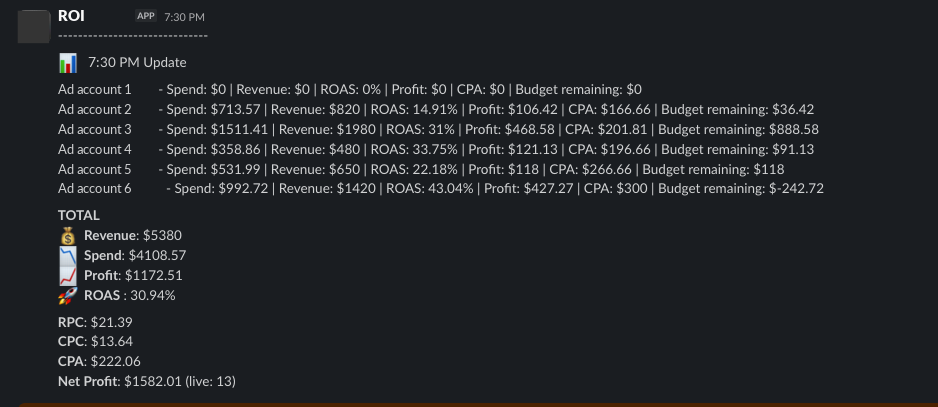
Want this in Slack every 15–30 minutes, depending on setup? See ROI.
Already on a tracker? See RedTrack alternative for pay-per-call.
Running ACA traffic this open enrollment? See ACA pay-per-call for media buyers.
FAQ
-
What is the formula for pay-per-call profit?
Net profit = call payout − Meta spend − Google spend − TikTok spend − call-platform fees, for one window and time zone.
-
What’s the difference between ROAS and ROI in pay-per-call?
ROAS compares payout with ad spend only. ROI compares net profit with all costs, including call-platform fees.
-
What is break-even cost per call, and how do I calculate it?
It is the most you can pay per call without losing money: average payout per call minus fees per call, using the same calls for both.
-
How do I calculate revenue per call (RPC)?
Call payout ÷ calls in the same window. Say whether you used all calls or billable calls.
-
Should call-platform fees count against profit?
Yes. They are a real cost, and the Easy Growth Ops formula subtracts them. Leaving them out overstates profit and ROI.
-
How do I calculate profit on pay-per-call campaigns from Facebook and Google ads?
Subtract Meta spend, Google spend, and call-platform fees from call payout, using the same window and time zone for all of them.
-
What’s a good ROAS for pay per call?
There is no universal number. Anything above your break-even ROAS (1 + fees ÷ ad spend) makes money before other overhead.
-
Why does ROAS mislead when payout is delayed, or when calls get rejected or returned?
Payout for a call can land after the call ends and can be adjusted later. So a mid-day ROAS can be too low while calls are still live, and too high if calls are later returned.
-
Is CPC cost per click or cost per call?
In Meta and Google Ads it is cost per click. Some pay-per-call reports, including ROI’s Slack readout, use CPC for cost per call. Label the column.
Sources
Third-party pages checked on 8 October 2026. Re-check before relying on them. All example numbers on this page are hypothetical.
- Google Ads Help: Glossary (ROAS, ROI, CPA)
- Google Ads Help: Understand your conversion tracking data
- Google Ads Help: About your Google Ads time zone setting
- Google Ads Help: Cost-per-click (CPC): Definition
- Meta Business Help Center: CPC (cost per link click)
- Meta Business Help Center: Change the time zone for your ad account
- Ringba: Summary Report
- Ringba: Call Details Report Column Dictionary
Easy Growth Ops is not affiliated with Google, Meta, or Ringba.
30 minutes
Book a meeting.
We’ll look at your stack. You share read-only access. First Slack update the same week.
Book a meetingOr read the full product page: ROI.