Integrations Ringba + Meta Ads
Ringba + Facebook Ads Profit Report: See Call Payout Next to Meta Spend
Ringba tracks call revenue and payout and can send calls back to Meta as conversions. Its documented reports don't put Meta ad spend next to that payout. To see profit, join Meta spend (Ads Manager export or Marketing API) with Ringba revenue or payout for the same window, then subtract call-platform fees. ROI does this in Slack every 15–30 minutes, depending on setup, with read-only access.
Updated
Key facts
- Ringba’s Summary and Call Details reports show Revenue, Payout, and Profit on the call side. They do not include Meta Ads spend.
- Ringba’s Facebook Offline Events integration pushes conversions to Meta. Ringba’s docs don’t describe it pulling spend from Meta (checked 8 October 2026).
- Net profit = call payout − Meta spend − Google spend − TikTok spend − call-platform fees.
- You can build that report in Sheets, with Make/n8n, or have ROI post it to Slack every 15–30 minutes, depending on setup.
The short answer
If you buy Meta traffic into Ringba, you already have two truthful systems that don’t talk to each other. Ads Manager knows spend. Ringba knows call revenue and payout. Neither screen is a P&L of the other. The report you actually want is the join: spend next to payout for the same time window, minus the call platform’s own fees, so you can tell whether an ad account is making money.
That join is what this page walks through: what Ringba already reports, what its Facebook integration does, the formula, and three ways to build the report. One of those ways is Easy Growth Ops ROI, which posts the P&L to Slack every 15–30 minutes, depending on setup.
What Ringba reports, and what it doesn’t
Ringba’s reporting is built for the call side of the stack. That is useful. It is not a Meta Ads profit report.
Ringba Summary and Call Details: Revenue, Payout, Profit
Ringba’s Summary report and Call Details report both expose Revenue, Payout, and Profit columns (as of 8 October 2026; see Ringba’s Summary Report and Call Details Report Column Dictionary). In Ringba’s own words:
- Revenue is “the gross amount of money earned from calls generated.”
- Payout is “the amount of money to be paid to your publisher” when the call meets the campaign’s payout criteria.
- Profit is “the net amount of money earned from the call after expenses.”
When you set up ROI, we configure which Ringba field to treat as “call payout” for your shop: Revenue or Payout, whichever matches how you get paid. That choice is made once, at setup.
Ringba’s Facebook integration: it sends conversions to Meta
Ringba’s Facebook Offline Events integration for Call-Only Ads pushes converted calls into Meta through the Conversions API so Ads Manager can attribute and optimize. Ringba’s own docs describe the flow as “push data about conversions that happened in Ringba into Facebook Ads” (as of 8 October 2026; Facebook Offline Events Integration – Call-Only Ads).
That is the opposite direction of a profit report: data flows from Ringba to Meta, and Ringba’s docs don’t describe Meta spend flowing back into Ringba’s reports. You can, and usually should, run the Facebook CAPI integration and a separate profit report. They do different jobs: one feeds Meta’s bidding, the other tells you whether the account is profitable.
The profit formula for Meta + Ringba
The formula Easy Growth Ops publishes for pay-per-call net profit is:
Net profit = call payout − Meta spend − Google spend − TikTok spend − call-platform fees.
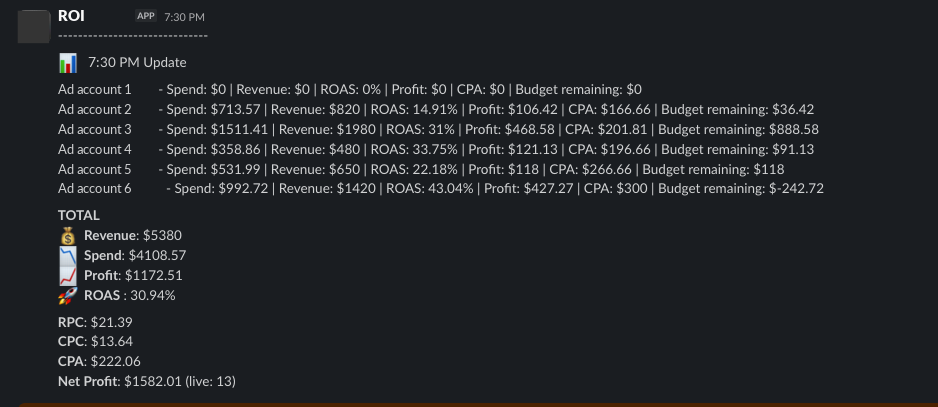
For a Meta-only shop the Google and TikTok terms are zero, but the shape of the P&L stays the same once you add other platforms. “Call payout” is the Ringba Revenue or Payout field you chose at setup. “Call-platform fees” means Ringba’s own fees. In ROI’s Slack readout, ROAS is return on ad spend, calculated as ROAS = (revenue − spend) ÷ spend, where revenue is that call payout figure. So $820 of revenue on $713.57 of spend is a 14.91% ROAS, and 0% means break-even. CPC is cost per call (not cost per click), and CPA is cost per acquisition.
Every formula, with a worked example, is in the pay-per-call profit formula guide.
Three ways to build a Ringba + Facebook profit report
Same math, three levels of automation. Pick based on how often you need the number and who maintains the join.
| Method | What you get | Who maintains it | Best when |
|---|---|---|---|
| Manual Sheets | CSV from Ads Manager + CSV from Ringba, joined by day | You, every reporting cycle | You check profit once a day or less |
| DIY Make / n8n | APIs into Sheets or Slack on a schedule | Whoever built the flow | You have someone who can own the workflow |
| ROI | Slack P&L every 15–30 minutes (depending on setup), built for you | Easy Growth Ops | The team needs the number without opening a dashboard |
None of these is click-level attribution. If you need calls tied back to the ad and keyword, that is a tracker’s job: the ROI page itself notes that RedTrack is stronger at click-ID attribution and sending call conversions back to Meta and Google, and ClickFlare lists Ringba among its call-tracking integrations for attributing calls to the ad, keyword, and campaign (as of 8 October 2026; ClickFlare integrations). A profit report can sit alongside a tracker.
For the RedTrack angle, see RedTrack alternative for pay-per-call.
Manual: Ads Manager export + Ringba CSV in Sheets
-
Export Meta spend. In Ads Manager, set the date
range and breakdown you want (usually by day and by ad account),
then export a CSV that includes spend. Or pull the same numbers
from Meta’s Ads Insights API, which returns
spendat the ad-account level by default (as of 8 October 2026; Ad Account Insights). - Export Ringba revenue or payout. In Ringba’s Reporting screen, set the same date range, open the Summary or Call Details report, and export the CSV. Keep the Revenue column, the Payout column, or both, depending on how you get paid. Ringba documents CSV export on the Summary report page.
- Align the windows. Put both exports into one sheet. Match rows by day (or by whatever grain you exported). Watch for mismatches: Ads Manager and Ringba can be set to different time zones, so the same “day” can cover different hours; pick one time zone and convert the other export to it. Take spend from Meta and calls and payout from Ringba; don’t mix in the conversions Meta reports under its own attribution window. If totals don’t line up, fix the windows before you trust the profit column.
-
Compute the formula. For each row:
call_payout − meta_spend − ringba_fees. Sum the day, then the week. Keep a separate column for fees so you can see what they cost. - Read ROAS and cost per call off the same sheet. ROAS = (call payout − Meta spend) ÷ Meta spend, the same definition ROI uses. Cost per call = Meta spend ÷ paid calls (Ringba’s Summary report counts calls that met the payout requirements in its Paid column).
The trade-off is time. Every export, paste, and window check happens again tomorrow. If you only need the number once a day, the sheet is fine. If you need it while a burst is running, it isn’t.
DIY automation: Make / n8n + Meta Marketing API + Ringba API
The same join can run on a schedule. Pull Meta spend from the Ads Insights API. Pull call logs from Ringba’s API (developers.ringba.com, as of 8 October 2026). Write the result to Sheets, or post it to Slack. Make.com and n8n both handle that pattern.
Plan for rate limits. Ringba’s call-log export endpoint is limited to 5 requests per minute, 20 per hour, and 200 per day per user per account (as of 8 October 2026; Why am I being rate limited?). Meta’s Insights API has its own limits. The cost of this option is not the tools; it is the person who keeps the workflow alive when an API changes.
Done-for-you: ROI posts the P&L to Slack every 15–30 minutes, depending on setup
ROI is the Slack P&L for pay-per-call buyers. It reads Meta Ads spend, Google Ads spend, and TikTok Ads spend, places call payout beside that spend from one call platform (Ringba, CallGrid, TrackDrive, Retreaver, or Phonexa), and posts net profit, ROAS, CPC (cost per call), CPA, and totals to Slack every 15–30 minutes, depending on setup. For now it reports per ad account, not per campaign. ROI lines up Meta spend and Ringba calls in US Eastern time (EST), so both sides of each total cover the same hours. Access is read-only: we never bid, pause, or scale ads, and you can revoke access. Setup is done for you; the first Slack update arrives the same week.
Proof from the ROI page: “LeadVIPS, a pay-per-call team buying on Meta and Google, went from 3 hours of daily reporting to zero.”
Founding price for the first 50 shops: $200 the first month (setup included), then $100 a month. Ten ad accounts are included. Each extra account is $25 a month. After 50 shops, new shops pay $150 a month. See ROI pricing.
What the Slack P&L looks like
The update is a short Slack message: each ad account, then the totals. For now ROI reports per account, not per campaign. Spend, call payout (labelled Revenue here), ROAS, profit, CPC (cost per call), and CPA sit in the same readout. Names in the screenshot are replaced.
“I’ve run almost $10 million in ad spend over the past three years. I can’t keep accounts open all day and sit there refreshing. … Google’s UI is late. The API is not.”
Adding Google and TikTok spend to the same report
The formula already has a slot for Google Ads and TikTok Ads spend. Once Meta + Ringba is working, those platforms drop into the same P&L without changing the shape of the report. ROI reads all three ad platforms next to one call platform.
If you also want yesterday’s winning Meta, Google, and TikTok ads in Slack before standup, that is Drops: $79 a month after a 14-day free trial, or $150 a month together with ROI.
FAQ
-
Does Ringba show my Facebook ad spend?
Not in the reports Ringba documents. Its Summary and Call Details reports show call-side Revenue, Payout, and Profit, and its Facebook Offline Events integration sends conversions to Meta (per Ringba’s docs, checked 8 October 2026). Meta Ads spend lives in Ads Manager, so a profit report has to join the two.
-
How do I see profit from Facebook ads when my calls run through Ringba?
Join Meta spend with Ringba Revenue or Payout for the same time window, then subtract Ringba fees. You can do that in a sheet, with a Make or n8n flow, or with ROI posting the P&L to Slack every 15–30 minutes, depending on setup.
-
How do I calculate ROAS for Ringba calls from Facebook?
ROAS = (call payout − Meta spend) ÷ Meta spend. That is how ROI computes it: (revenue − spend) ÷ spend. Call payout is the Ringba Revenue or Payout field you treat as income. Net profit still subtracts call-platform fees on top of that.
-
Should I use Ringba’s Facebook CAPI integration and a profit report?
Yes. They do different jobs. CAPI feeds conversions back to Meta for bidding and reporting. A profit report puts Meta spend next to Ringba payout so you can see whether the account is making money.
-
How often should I check profit on Meta call campaigns?
Often enough that you can pause a burst or scale a winner without waiting for end of day. ROI refreshes every 15–30 minutes, depending on setup. A daily sheet is enough if you don’t need to act mid-flight.
-
Can I do this in Google Sheets?
Yes. Export Ads Manager and Ringba to CSV, or pull both through their APIs into a sheet. The trade-off is maintenance: you own the join, the time zones, and the fee column. See the manual steps above.
-
Which Ringba field does ROI use as call payout?
Either Revenue or Payout. We configure it per customer at setup, based on how you get paid in that Ringba account.
-
What does ROI cost?
For the first 50 shops: $200 the first month including setup, then $100 a month. Ten ad accounts included. Each extra ad account is $25 a month. After 50, new shops pay $150 a month.
Sources
Third-party pages checked on 8 October 2026. Re-check before relying on them.
- Ringba: Summary Report
- Ringba: Call Details Report Column Dictionary
- Ringba: Facebook Offline Events Integration – Call-Only Ads
- Ringba: Why am I being rate limited?
- Ringba API documentation
- Meta for Developers: Ad Account Insights
- ClickFlare: CRM and call tracking integrations
Easy Growth Ops is not affiliated with Ringba, Meta, or ClickFlare.
30 minutes
Book a meeting.
We’ll look at your stack. You share read-only access. First Slack update the same week.
Book a meetingOr read the full product page: ROI. Using RedTrack? Read RedTrack alternative for pay-per-call.